A client portal browser demo
Explore the browser-only demo at /client/. It uses fictional sample data to show six tabs, a sample gauge, messages and a document handoff interface. It has no real authentication or document storage.
No app to install. The interface is designed for modern browsers and includes a skip link, labelled controls and keyboard support. Demo content does not represent a live client account.
📌 Browser demo · fictional sample data
Demo passcode: finclar2026 · Demo OTP: 123456 · Open the portal → · These browser-side checks do not authenticate a real account.
Explore six sample tabs
Each tab focuses on one thing. The top bar stays put — search, dark-mode toggle, notifications and account menu are always one click away regardless of which tab you're on.
Sample dashboard view
Sample dashboard with a greeting, illustrative 98% gauge, example stat cards and deadlines, sample team details, quick actions and activity feed. These values are fictional and are not compliance measurements.
Drag, drop, done
An 8-folder grid (bank statements, GST returns, audit working papers, ROC filings, engagement letters, TDS certificates, MIS dashboards, other) plus a browser demo upload control that opens an email draft. Delivery is unconfirmed; visitors should agree a document-sharing method with the office. Sample file rows do not represent stored client documents.
Filterable, named-owner board
Twelve upcoming deadlines with filter chips (All / GST / TDS / ROC / Audit / Urgent) and a status badge per item. Every deadline shows the Finclar owner — Aqeel for GST + audit, the Finclar Team for direct tax, Inamul for ROC — so escalation has a face.
Outstanding at a glance
Four-stat row at the top (Outstanding, Paid YTD, Avg invoice, DSO), invoices table beneath, and a payment-methods card with UPI deep-link and pre-filled NEFT details. Payment links and invoice details shown are sample data.
Threaded by topic
A 5-thread inbox with fictional sample personas. Open a thread to see sample messages; composing appends a sample message in this browser only and does not deliver it to the office.
Toggles that actually persist
Four cards — Notifications, Entity details, Security, Appearance — with seven role=switch toggles that save to localStorage with proper aria-checked updates. The dark-mode toggle in Appearance is synced bi-directionally with the top-bar 🌓 button.
Try the browser demo
Use the public browser demo at /client/. The passcode and OTP are demo-only checks in the page, not real authentication.
Enter passcode
This demo accepts the published sample passcode finclar2026. The magic-link option is a simulated interface; it does not send a link or authenticate a user.
6-digit OTP
The demo accepts sample code 123456 and shows keyboard navigation. No OTP is sent; this is not production sign-in.
Dashboard loaded
A browser-only demo state lasts up to 8 hours in sessionStorage; preferences may persist in localStorage. This does not establish an authenticated session.
What the demo interface shows
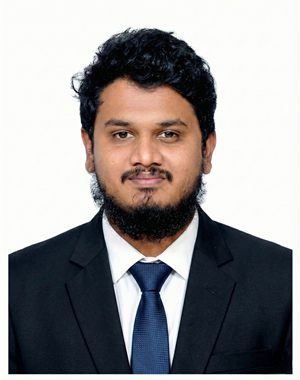
The portal demo is built and maintained by Inamul, who leads Finclar's ROC / MCA practice plus the automation & web vertical. The dashboard figures and gauge are illustrative sample data, not a scored or measured client compliance record. The message and upload actions in this demo are not delivery channels. Full bio →
Quietly built right
The public portal demo uses fictional records and simulated interactions. Accessibility and performance statements below describe implementation intent, not independent certification or a current measurement.
Accessibility features
- Skip-to-content link at the top of every page
- All 12 form inputs labelled (7
label for+ 5aria-label) - Toggles use
role="switch"+aria-checkedupdates - OTP inputs labelled per digit + auto-advance keyboard-only navigation
- Color and contrast are styled for light and dark modes; not an accessibility certification
Implementation notes
- No JS framework — pure vanilla JS
- No external runtime dependencies
- Inline CSS variables + critical path optimised
- No current transfer-size measurement is claimed here
- No current load-time measurement is claimed here
Client-side first
- Demo state may be kept in
sessionStorage; this is not authentication - Demo preferences may be kept in
localStorage - Demo upload opens an email draft; attach files manually. Draft delivery is unconfirmed.
- Ask the office before sharing real client documents
- Agree a document-sharing method with the office before sending sensitive files.
Questions we hear most
Do I need an account to view the portal?
The public demo accepts passcode finclar2026 and OTP 123456. These are browser-side sample checks, not real authentication. All dashboard records are fictional. The document action opens an email draft; files are not attached automatically and delivery is unconfirmed. Agree document-sharing with the office first.
Is my data secure?
This public page links to a browser-only demo. The sample passcode and OTP checks are not real authentication. The demo does not provide a protected account or document storage; its browser state is not a security boundary.
How does the demo handle document uploads?
The Documents tab has a drag-drop zone plus 8 pre-categorised folders. In the demo, choosing files opens an email draft; files are not attached automatically and delivery is unconfirmed. Please agree a document-sharing method with the office before sending sensitive documents.
Why is there a compliance gauge?
The gauge is an illustrative sample value only. It does not calculate, verify or measure filing punctuality, document completeness, reconciliation status or audit readiness.
Does the portal support multiple entities?
The interface shows sample entity details only. It does not connect to real client entities or records. Ask the office about services and tools available for your engagement.
Who built the portal?
S A Mohammed Inamul Hasan, Team Member of Finclar, who leads our ROC / MCA practice plus the automation + web-build vertical.
Want to discuss document sharing with the office?
Open the demo with passcode finclar2026 · OTP 123456. This is sample data only. Contact the office to agree a document-sharing method before sending files.